Someone sent you a script to read in Inkwell. Here’s how to read it, leave notes, and what the writer can see.
A writer has sent you their draft and would love your notes. You don’t need Inkwell, an app, or an account — just the link they sent you and a web browser on your phone, tablet or computer.
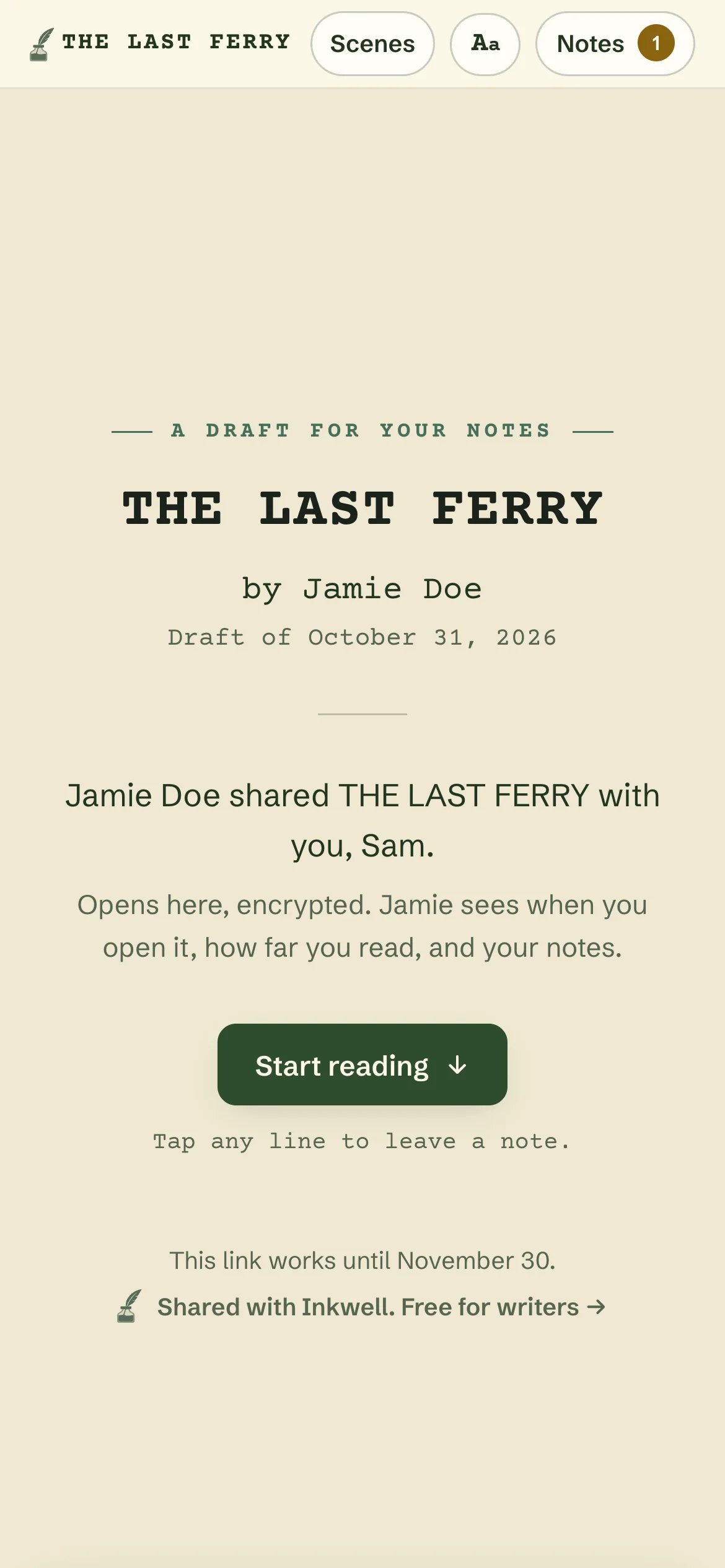
Every shared draft opens on a cover with the title, the writer and your name.
Tap or click the link the writer sent you. Make sure you open the entire link — the part after the # is what unlocks the draft. If you see “This link is incomplete” or “We couldn’t find this draft”, copy the whole link from the message and try again.
2
Enter the passphrase, if asked
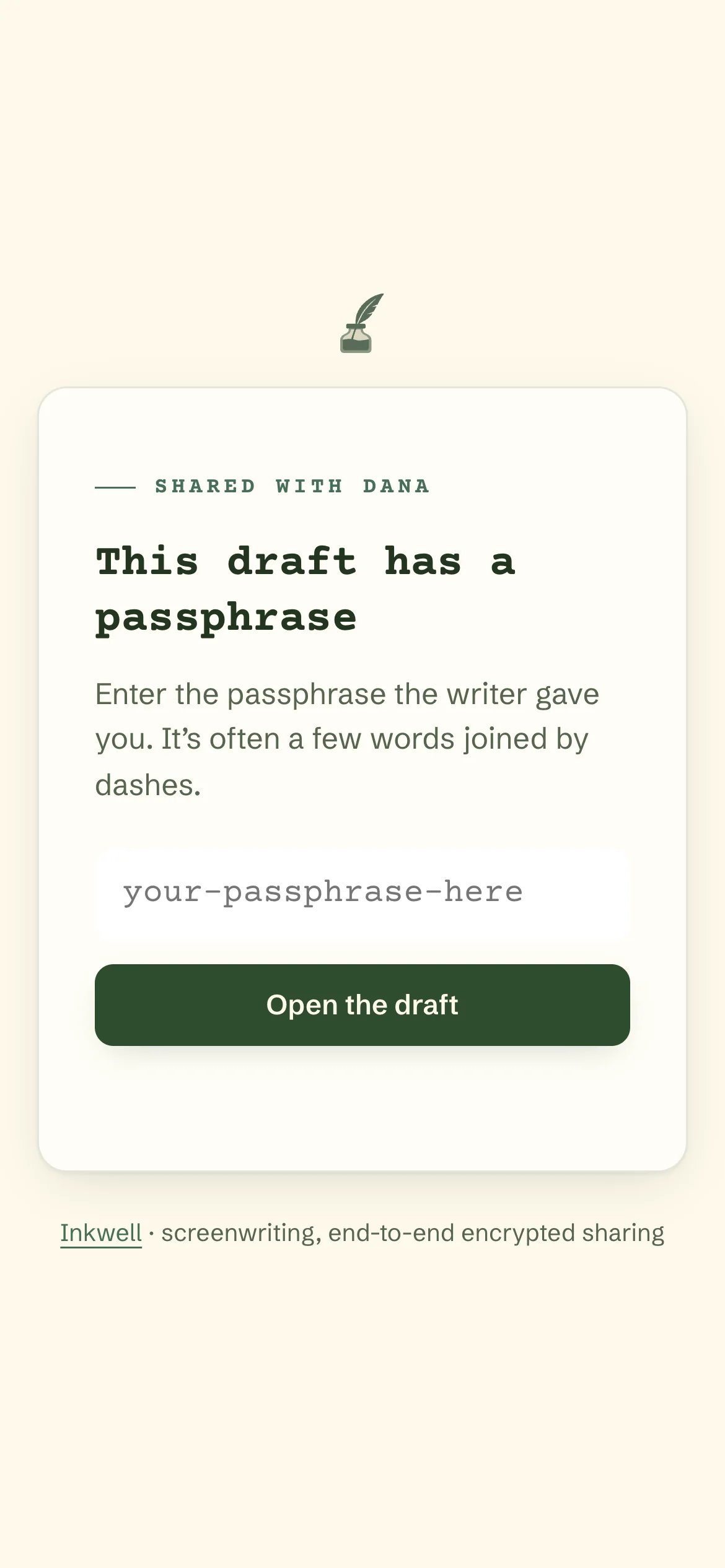
Some drafts are protected with a passphrase — usually a few words joined by dashes, like maple-orbit-tuesday. The writer will have sent it to you separately (for example, by text if the link came by email). Unlocking takes a second or two on purpose; that’s part of what keeps the draft safe.You only need to enter it once on each device and browser.
A passphrase-protected draft asks for the passphrase before it opens.
3
Start reading
The cover, headed “A draft for your notes”, shows the title, the writer, the draft date, and your name: “Jamie shared THE TITLE with you, Sam.” Click Start reading.
There are two ways to read, and you can switch any time:
Page view (the default on computers and tablets) shows the script exactly as it would print — the same pages and page numbers as the writer’s PDF, so “page 42” means the same thing to both of you. At the largest text sizes, scroll or swipe sideways to see the whole page.
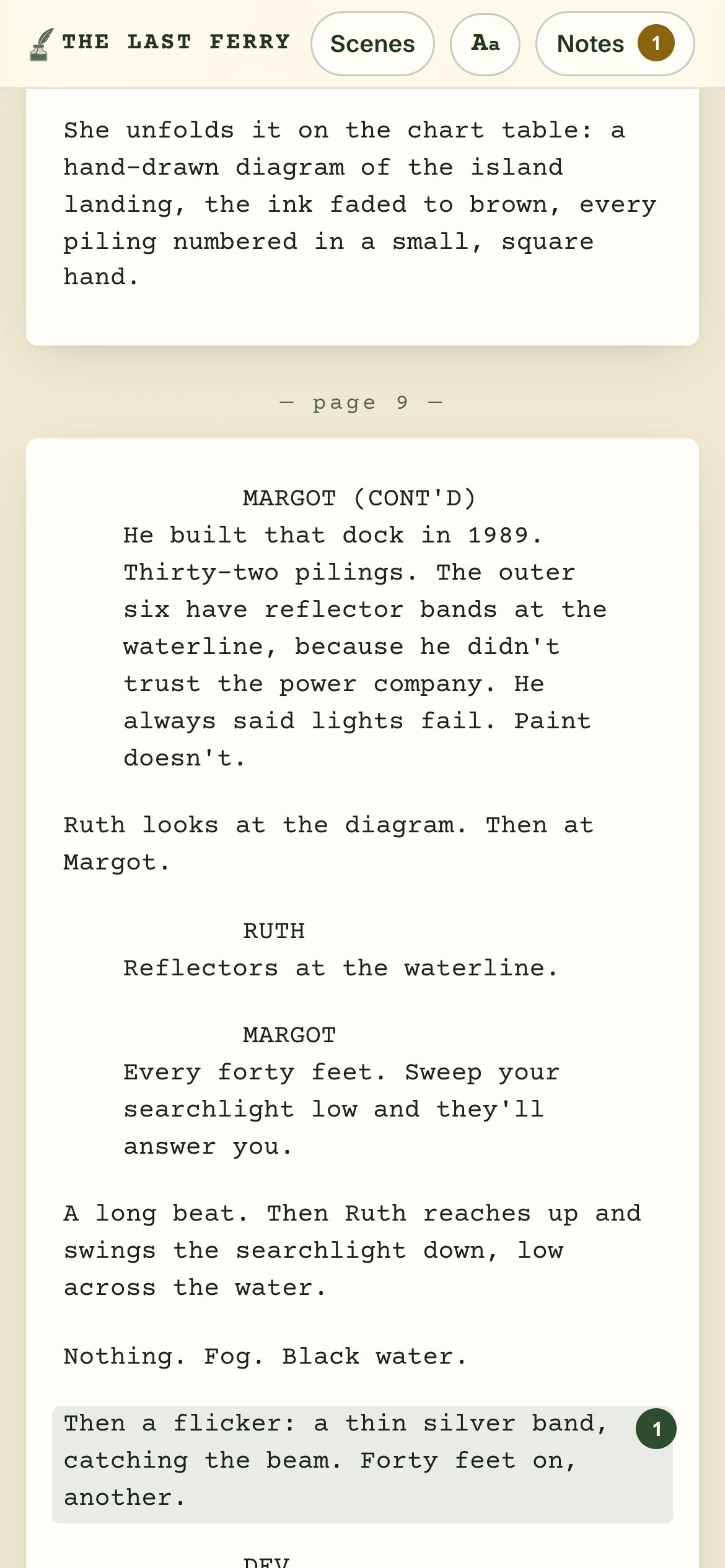
Reading view (the default on phones) flows the script into a single comfortable column of larger text. Quiet ”— page 12 —” markers keep you in step with the printed pages, and a speech that runs over a page break reads as one, marked (CONT’D).
Reading view on a phone: one column, with page markers.
Use the controls at the top:
Scenes jumps straight to any scene.
Aa switches between Page view and Reading view, changes the text size (Small, Default, Large, Larger), and picks Light, Dark or Auto (follows your device).
Come back any time. Open the same link later and you’ll be offered Continue from page … to pick up where you stopped.
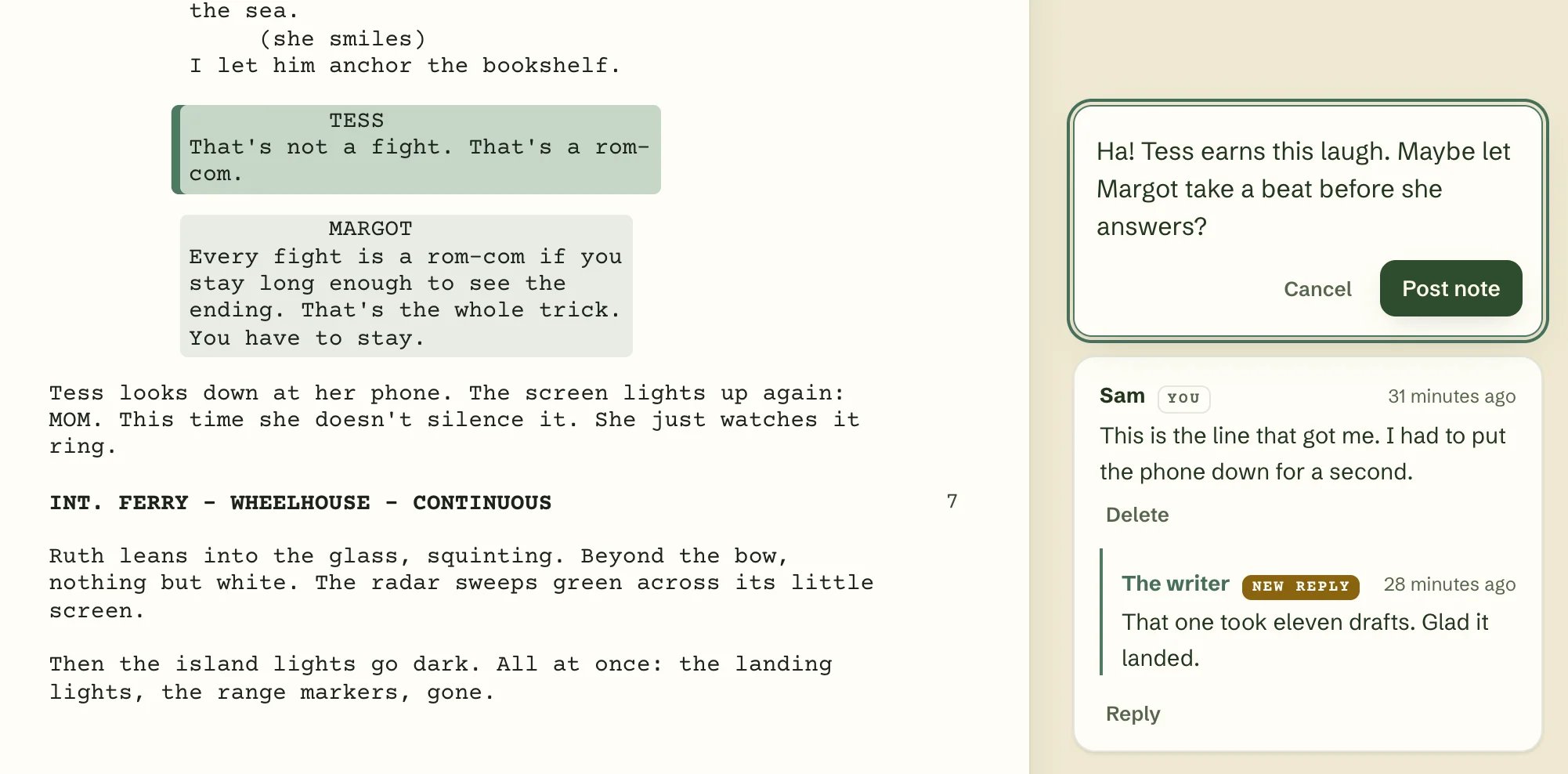
Tap (or click) any line. Your note attaches to the whole piece of script it’s part of: a scene heading, a paragraph of action, or a whole speech — the character’s name, parentheticals, dialogue and lyrics together. On a keyboard, use the arrow keys to move between them and press Enter.
2
Write your note
Type your note (up to 4,000 characters) and click Post note. It’s pinned to that passage, so the writer sees exactly what you were reacting to.
3
Keep going
Leave as many notes as you like. Notes at the top lists everything you’ve written, and the writer’s replies. You can delete any of your own notes.
Click any line to leave a note in the margin.
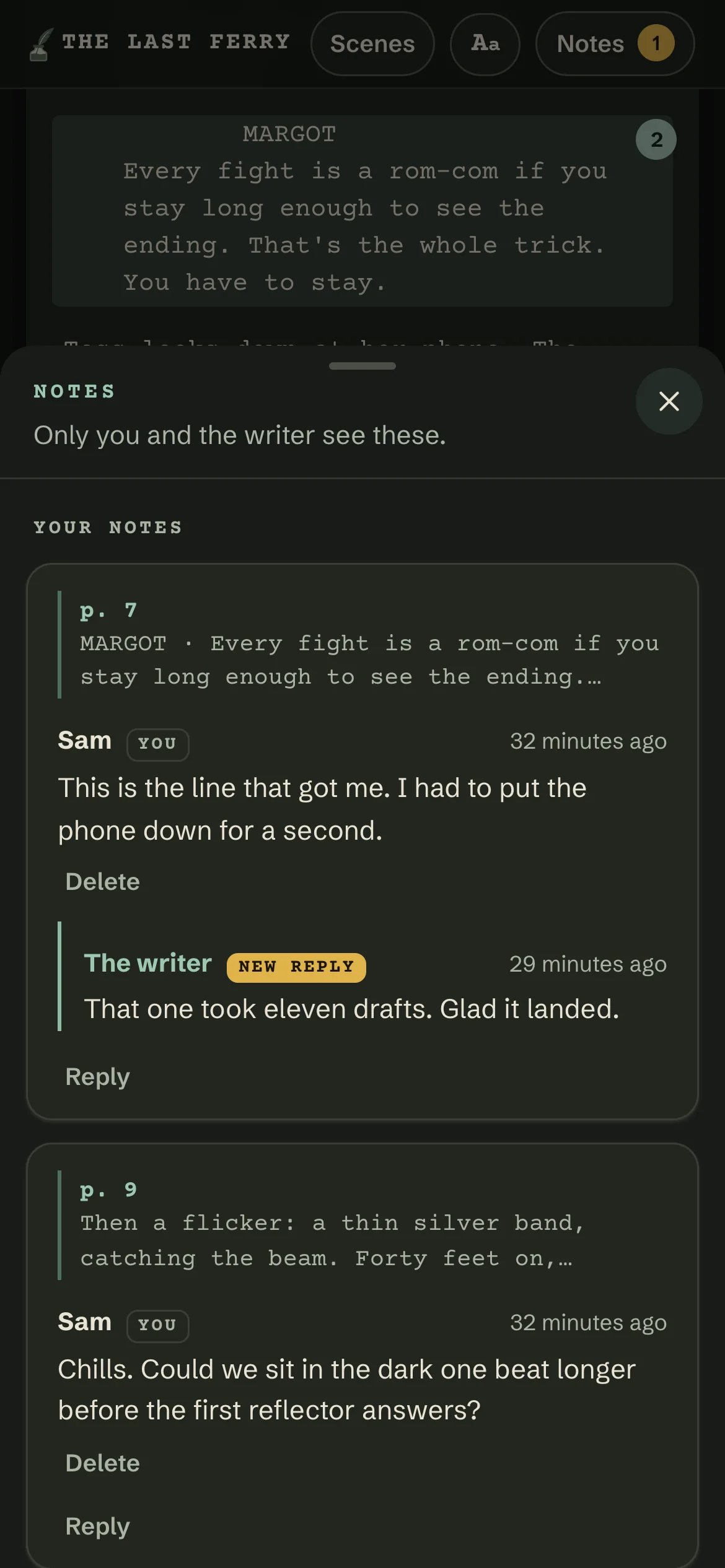
On a phone, Notes opens as a sheet with your notes and the writer's replies.
If you lose your connection while writing, your unsent note is kept on your device, and the page offers to pick up where you left off next time.
When the writer answers, their reply appears under your note. If you have the page open, it shows up within a minute; otherwise you’ll see it, marked New reply, next time you open the link. When the writer has dealt with a note, it’s marked resolved by the writer.
Usually, only you and the writer see your notes. Some writers share a draft with a group so everyone can see each other’s notes. When that’s the case, the cover says “Other readers of this draft can see your notes too.”, and the Notes list shows other readers’ notes under their names.Your notes appear under the name the writer gave your link — the one on the cover (“…with you, Sam”).
how far you’ve read (the furthest page you reached) and whether you finished;
how many notes you left, and what they say.
The cover tells you this up front: “Jamie sees when you open it, how far you read, and your notes.”The page also has a few small links to Inkwell: on the cover, at the end of the draft, and once after your first note. Inkwell counts which of those get clicked, but not who you are or what you were reading. That’s all: nobody can see what else you do in your browser, and the page doesn’t follow you anywhere else.
No account, no sign-up. You never give Inkwell your name, email or anything else.
The draft and your notes are encrypted. The key that unlocks them is in the part of the link after the #, which browsers never send to any server. Inkwell’s servers store the draft and your notes in a form they can’t read — only you, the writer, and (if notes are shared) the draft’s other readers can.
No trackers. The reading page runs only Inkwell’s own code — no ads, no analytics scripts, no third-party anything.
The title stays out of your history. While you read, the browser tab says “Draft from Jamie · Inkwell”, not the script’s title, and a shared link previews in messaging apps as “A script draft, shared with you”.
Kept on your device. So you don’t have to unlock the draft again or lose your place, your browser remembers the unlock key, your reading position, your text-size and theme choices, and any note you haven’t sent yet. Clearing your browser’s site data removes them.
Please don’t forward the link. It’s yours: anyone who opens it can read the draft, and any notes they leave will appear under your name.
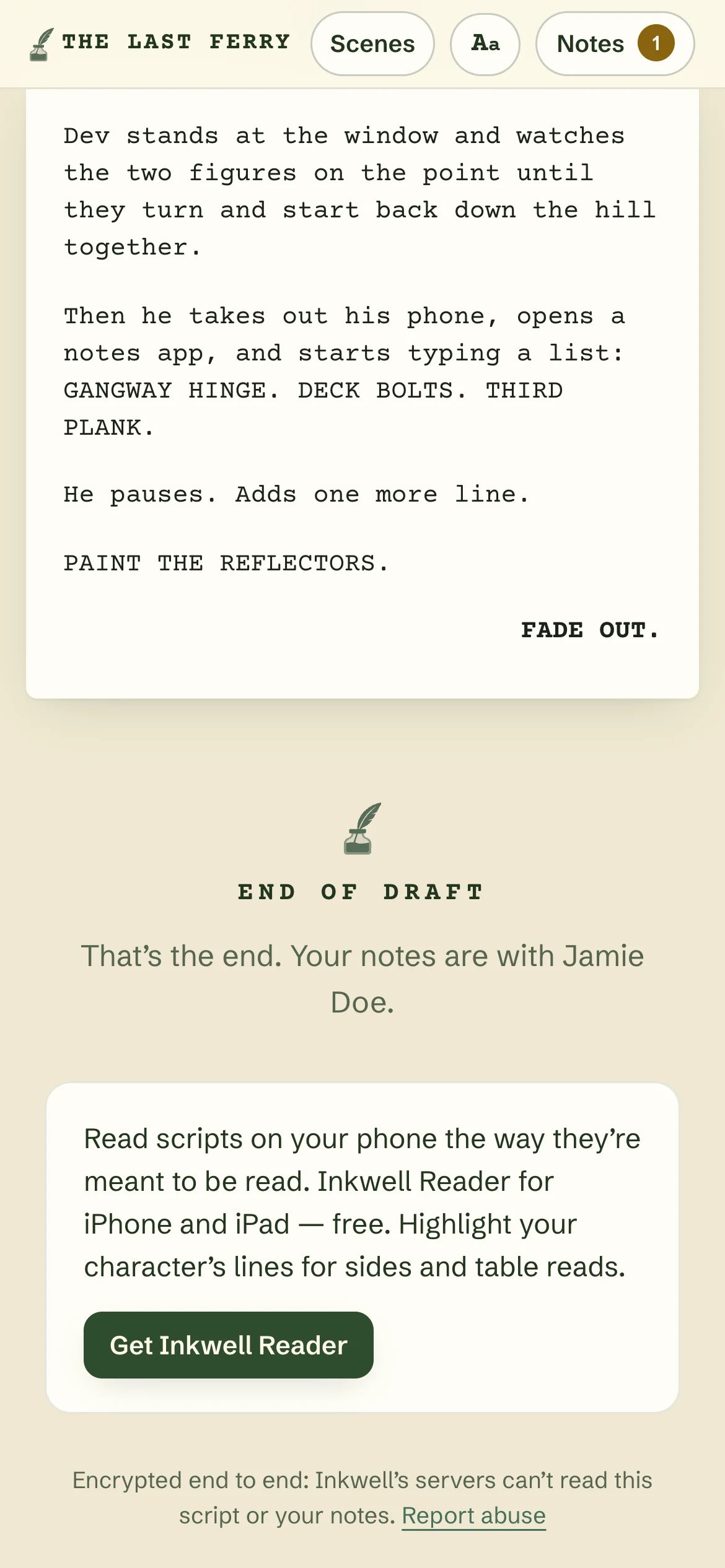
Shared drafts are made with Inkwell, the screenplay editor for Mac. The editor is free.
{"docsConfig":{"theme":"mint","$schema":"https://mintlify.com/docs.json","name":"Inkwell Documentation","colors":{"primary":"#16A34A","light":"#07C983","dark":"#15803D"},"logo":{"light":"https://mintcdn.com/inkwell/x2U9NXHPQorWIctc/logo/logo_text_light.svg?fit=max\u0026auto=format\u0026n=x2U9NXHPQorWIctc\u0026q=85\u0026s=dc6ecbbb7cbef1f8e03118912a98b31d","dark":"https://mintcdn.com/inkwell/x2U9NXHPQorWIctc/logo/logo_text_dark.svg?fit=max\u0026auto=format\u0026n=x2U9NXHPQorWIctc\u0026q=85\u0026s=390a2580241b0d086fefbc6b9ee70219","href":"http://inkwell.app/"},"favicon":"https://mintcdn.com/inkwell/x2U9NXHPQorWIctc/favicon.svg?fit=max\u0026auto=format\u0026n=x2U9NXHPQorWIctc\u0026q=85\u0026s=cba0d07eeca4d7f05c708a4b829201bc","navbar":{"links":[{"href":"https://inkwell.app","label":"Home"},{"href":"https://blog.inkwell.app","label":"Blog"},{"href":"https://inkwell.app/download","label":"Download"}],"primary":{"type":"button","label":"Get Inkwell","href":"https://inkwell.app/download"}},"footer":{"socials":{"x":"https://x.com/tryinkwell"},"links":[{"header":"Product","items":[{"label":"Inkwell for Mac","href":"https://inkwell.app"},{"label":"Download","href":"https://inkwell.app/download"},{"label":"Pricing","href":"https://inkwell.app/pricing"},{"label":"Quill AI","href":"https://inkwell.app/quill"}]},{"header":"Compare","items":[{"label":"All comparisons","href":"https://inkwell.app/compare"},{"label":"Inkwell vs Final Draft","href":"https://inkwell.app/compare/final-draft"},{"label":"Inkwell vs Highland","href":"https://inkwell.app/compare/highland"},{"label":"Inkwell vs Beat","href":"https://inkwell.app/compare/beat"}]},{"header":"Support","items":[{"label":"FAQ","href":"https://inkwell.app/faq"},{"label":"Contact","href":"mailto:support@inkwell.app"},{"label":"Privacy","href":"https://inkwell.app/privacy"}]}]},"styling":{"latex":true},"navigation":{"global":{"anchors":[]},"pages":[]}},"deployment":{"deploymentMetadataValue":{"subdomain":"inkwell","hasAudioNarration":false,"actualSubdomain":"inkwell","customDomains":["docs.inkwell.app"],"gitSource":{"type":"github","owner":"jrundquist","repo":"inkwell-docs","deployBranch":"main","contentDirectory":"","isPrivate":true,"mountPath":"","label":""},"chroma":{"liveDeploymentHistoryId":"6ae629e93a58a57f20b8b189","collectionId":"b087d284-b546-4eba-bf53-df81069df794","schemaVersion":"v3","latestBuiltDeploymentHistoryId":"6ae629e93a58a57f20b8b189"},"entitlements":{},"buildId":"6ae6abff52c8551247d71af1","clientVersion":"0.0.4044","searchFilterCounts":[{"language":"default","tag":"Guides","count":35},{"language":"default","tag":"What's New","count":26},{"language":"default","tag":"Desktop Release Notes","count":25},{"language":"default","tag":"Getting Started","count":5},{"language":"default","tag":"Quill AI","count":5},{"language":"default","tag":"Customization","count":4},{"language":"default","tag":"Project Panel","count":4},{"language":"default","tag":"Writing in Inkwell","count":4},{"language":"default","tag":"Account \u0026 Support","count":3},{"language":"default","tag":"Managing Files","count":3}]},"assistantConfig":{},"basePath":"","hasChatPermissions":false,"hasWebMcpPermissions":false,"toggles":[{"name":"kill-isr","enabled":true,"variant":{"name":"disabled","enabled":false,"feature_enabled":true},"impressionData":false},{"name":"agent-mintlify-slack","enabled":true,"variant":{"name":"disabled","enabled":false,"feature_enabled":true},"impressionData":false},{"name":"agent-integrations-settings","enabled":true,"variant":{"name":"disabled","enabled":false,"feature_enabled":true},"impressionData":false},{"name":"automations-pr-grouping","enabled":true,"variant":{"name":"disabled","enabled":false,"feature_enabled":true},"impressionData":false},{"name":"custom-prefix","enabled":true,"variant":{"name":"disabled","enabled":false,"feature_enabled":true},"impressionData":false},{"name":"analytics-v7","enabled":true,"variant":{"name":"disabled","enabled":false,"feature_enabled":true},"impressionData":false},{"name":"user-flows-analytics","enabled":true,"variant":{"name":"disabled","enabled":false,"feature_enabled":true},"impressionData":false},{"name":"no-publish-flow","enabled":true,"variant":{"name":"disabled","enabled":false,"feature_enabled":true},"impressionData":false},{"name":"workos-onboarding","enabled":true,"variant":{"name":"disabled","enabled":false,"feature_enabled":true},"impressionData":false},{"name":"llms-txt-v2","enabled":true,"variant":{"name":"disabled","enabled":false,"feature_enabled":true},"impressionData":false},{"name":"snapshot-serving-live","enabled":true,"variant":{"name":"disabled","enabled":false,"feature_enabled":true},"impressionData":false},{"name":"stripTemperatureMiddleware","enabled":true,"variant":{"name":"disabled","enabled":false,"feature_enabled":true},"impressionData":false},{"name":"support-platform-pylon-zendesk","enabled":true,"variant":{"name":"disabled","enabled":false,"feature_enabled":true},"impressionData":false},{"name":"snapshot-serving","enabled":true,"variant":{"name":"disabled","enabled":false,"feature_enabled":true},"impressionData":false},{"name":"instant-rollback","enabled":true,"variant":{"name":"disabled","enabled":false,"feature_enabled":true},"impressionData":false},{"name":"granular-notifications-server","enabled":true,"variant":{"name":"disabled","enabled":false,"feature_enabled":true},"impressionData":false},{"name":"granular-notifications","enabled":true,"variant":{"name":"disabled","enabled":false,"feature_enabled":true},"impressionData":false},{"name":"automations-fable","enabled":true,"variant":{"name":"disabled","enabled":false,"feature_enabled":true},"impressionData":false},{"name":"fixed-ai-action-pricing","enabled":true,"variant":{"name":"disabled","enabled":false,"feature_enabled":true},"impressionData":false},{"name":"automation-resolve-merge-conflict","enabled":true,"variant":{"name":"disabled","enabled":false,"feature_enabled":true},"impressionData":false},{"name":"scoped-publishing","enabled":true,"variant":{"name":"disabled","enabled":false,"feature_enabled":true},"impressionData":false},{"name":"mintql","enabled":true,"variant":{"name":"disabled","enabled":false,"feature_enabled":true},"impressionData":false},{"name":"page-level-analytics","enabled":true,"variant":{"name":"disabled","enabled":false,"feature_enabled":true},"impressionData":false},{"name":"editor-version-history-v2","enabled":true,"variant":{"name":"disabled","enabled":false,"feature_enabled":true},"impressionData":false},{"name":"billing-page-v2","enabled":true,"variant":{"name":"disabled","enabled":false,"feature_enabled":true},"impressionData":false},{"name":"full-page-search","enabled":true,"variant":{"name":"disabled","enabled":false,"feature_enabled":true},"impressionData":false},{"name":"workspace-projects","enabled":true,"variant":{"name":"disabled","enabled":false,"feature_enabled":true},"impressionData":false},{"name":"assistant-v5","enabled":true,"variant":{"name":"disabled","enabled":false,"feature_enabled":true},"impressionData":false},{"name":"byok-sep-25","enabled":true,"variant":{"name":"disabled","enabled":false,"feature_enabled":true},"impressionData":false},{"name":"fork-pr-previews","enabled":true,"variant":{"name":"disabled","enabled":false,"feature_enabled":true},"impressionData":false},{"name":"revalidation-jwt","enabled":true,"variant":{"name":"disabled","enabled":false,"feature_enabled":true},"impressionData":false},{"name":"vite-origin","enabled":true,"variant":{"name":"disabled","enabled":false,"feature_enabled":true},"impressionData":false},{"name":"billing-updated-9-15","enabled":true,"variant":{"name":"disabled","enabled":false,"feature_enabled":true},"impressionData":false},{"name":"workos-sso-scim","enabled":true,"variant":{"name":"disabled","enabled":false,"feature_enabled":true},"impressionData":false},{"name":"hobby-abuse-scan","enabled":true,"variant":{"name":"disabled","enabled":false,"feature_enabled":true},"impressionData":false},{"name":"dashboard-inbox","enabled":true,"variant":{"name":"disabled","enabled":false,"feature_enabled":true},"impressionData":false},{"name":"workos-signup","enabled":true,"variant":{"name":"disabled","enabled":false,"feature_enabled":true},"impressionData":false},{"name":"turbopuffer-dual-write","enabled":true,"variant":{"name":"disabled","enabled":false,"feature_enabled":true},"impressionData":false},{"name":"workos-enabled","enabled":true,"variant":{"name":"disabled","enabled":false,"feature_enabled":true},"impressionData":false},{"name":"approve-review-flow","enabled":true,"variant":{"name":"disabled","enabled":false,"feature_enabled":true},"impressionData":false},{"name":"sso-setup-deadline-banner","enabled":true,"variant":{"name":"disabled","enabled":false,"feature_enabled":true},"impressionData":false}],"googleFontsInlined":false},"customCss":[],"page":{"pagePath":"sharing/opening-a-shared-draft","slug":"/sharing/opening-a-shared-draft","pageMetadata":{"title":"Opening a shared draft","description":"Someone sent you a script to read in Inkwell. Here's how to read it, leave notes, and what the writer can see.","href":"/sharing/opening-a-shared-draft"},"description":{"compiledSource":"\"use strict\";\nconst {jsx: _jsx} = arguments[0];\nconst {useMDXComponents: _provideComponents} = arguments[0];\nfunction _createMdxContent(props) {\n const _components = {\n p: \"p\",\n ..._provideComponents(),\n ...props.components\n };\n return _jsx(_components.p, {\n children: \"Someone sent you a script to read in Inkwell. Here’s how to read it, leave notes, and what the writer can see.\"\n });\n}\nfunction MDXContent(props = {}) {\n const {wrapper: MDXLayout} = {\n ..._provideComponents(),\n ...props.components\n };\n return MDXLayout ? _jsx(MDXLayout, {\n ...props,\n children: _jsx(_createMdxContent, {\n ...props\n })\n }) : _createMdxContent(props);\n}\nreturn {\n default: MDXContent\n};\n","frontmatter":{},"scope":{}},"pageType":"default","mdx":{"mdxSource":{"compiledSource":"\"use strict\";const{Fragment:_Fragment,jsx:_jsx,jsxs:_jsxs}=arguments[0];const{useMDXComponents:_provideComponents}=arguments[0];function _createMdxContent(props){const _components={a:`a`,code:`code`,em:`em`,li:`li`,p:`p`,strong:`strong`,ul:`ul`,..._provideComponents(),...props.components},{Frame,Heading,OptimizedImage,Step,Steps}=_components;if(!Frame)_missingMdxReference(`Frame`,true);if(!Heading)_missingMdxReference(`Heading`,true);if(!OptimizedImage)_missingMdxReference(`OptimizedImage`,true);if(!Step)_missingMdxReference(`Step`,true);if(!Steps)_missingMdxReference(`Steps`,true);return _jsxs(_Fragment,{children:[_jsx(_components.p,{children:`A writer has sent you their draft and would love your notes. You don’t need Inkwell, an app, or an account — just the link they sent you and a web browser on your phone, tablet or computer.`}),`\n`,_jsx(Frame,{caption:`Every shared draft opens on a cover with the title, the writer and your name.`,children:_jsx(OptimizedImage,{style:{maxWidth:`360px`,margin:`0 auto`},src:`https://mintcdn.com/inkwell/T9SkbcLpSetuxMo4/images/share/reader-cover-phone.webp?fit=max\u0026auto=format\u0026n=T9SkbcLpSetuxMo4\u0026q=85\u0026s=fe5849c0498d2fef9c416d7a3ddf812c`,alt:`The cover of a shared draft on a phone. Under the heading A draft for your notes: THE LAST FERRY, by Jamie Doe, Draft of October 31, 2026. Then: Jamie Doe shared THE LAST FERRY with you, Sam. Opens here, encrypted. Jamie sees when you open it, how far you read, and your notes. A Start reading button, the hint Tap any line to leave a note, This link works until November 30, and Shared with Inkwell. Free for writers.`,\"data-og-width\":`1170`,width:`1170`,\"data-og-height\":`2532`,height:`2532`,\"data-path\":`images/share/reader-cover-phone.webp`,\"data-optimize\":`true`,\"data-opv\":`3`,srcset:`https://mintcdn.com/inkwell/T9SkbcLpSetuxMo4/images/share/reader-cover-phone.webp?w=280\u0026fit=max\u0026auto=format\u0026n=T9SkbcLpSetuxMo4\u0026q=85\u0026s=786a6b6b41c7c4030b5838b4c83da784 280w, https://mintcdn.com/inkwell/T9SkbcLpSetuxMo4/images/share/reader-cover-phone.webp?w=560\u0026fit=max\u0026auto=format\u0026n=T9SkbcLpSetuxMo4\u0026q=85\u0026s=3f9001db06b4ae904a19fd564afaecbe 560w, https://mintcdn.com/inkwell/T9SkbcLpSetuxMo4/images/share/reader-cover-phone.webp?w=840\u0026fit=max\u0026auto=format\u0026n=T9SkbcLpSetuxMo4\u0026q=85\u0026s=f1d4ef86c5e44038f2a44e65a7ba4f6f 840w, https://mintcdn.com/inkwell/T9SkbcLpSetuxMo4/images/share/reader-cover-phone.webp?w=1100\u0026fit=max\u0026auto=format\u0026n=T9SkbcLpSetuxMo4\u0026q=85\u0026s=96eaf8082e629bb90fc2780346159be3 1100w, https://mintcdn.com/inkwell/T9SkbcLpSetuxMo4/images/share/reader-cover-phone.webp?w=1650\u0026fit=max\u0026auto=format\u0026n=T9SkbcLpSetuxMo4\u0026q=85\u0026s=082030e9811f3f4e7a8836bac2ad24a4 1650w, https://mintcdn.com/inkwell/T9SkbcLpSetuxMo4/images/share/reader-cover-phone.webp?w=2500\u0026fit=max\u0026auto=format\u0026n=T9SkbcLpSetuxMo4\u0026q=85\u0026s=a8d59c1052ce1616aaa451ea3e5b2744 2500w`})}),`\n`,_jsx(Heading,{level:`2`,id:`open-the-draft`,children:`Open the draft`}),`\n`,_jsxs(Steps,{children:[_jsx(Step,{title:`Open the whole link`,children:_jsxs(_components.p,{children:[`Tap or click the link the writer sent you. Make sure you open the `,_jsx(_components.strong,{children:`entire`}),` link — the part after the `,_jsx(_components.code,{children:`#`}),` is what unlocks the draft. If you see “This link is incomplete” or “We couldn’t find this draft”, copy the whole link from the message and try again.`]})}),_jsxs(Step,{title:`Enter the passphrase, if asked`,children:[_jsxs(_components.p,{children:[`Some drafts are protected with a passphrase — usually a few words joined by dashes, like `,_jsx(_components.code,{children:`maple-orbit-tuesday`}),`. The writer will have sent it to you separately (for example, by text if the link came by email). Unlocking takes a second or two on purpose; that’s part of what keeps the draft safe.`]}),_jsx(_components.p,{children:`You only need to enter it once on each device and browser.`}),_jsx(Frame,{caption:`A passphrase-protected draft asks for the passphrase before it opens.`,children:_jsx(OptimizedImage,{style:{maxWidth:`360px`,margin:`0 auto`},src:`https://mintcdn.com/inkwell/T9SkbcLpSetuxMo4/images/share/reader-passphrase-phone.webp?fit=max\u0026auto=format\u0026n=T9SkbcLpSetuxMo4\u0026q=85\u0026s=3bd6c1fcd59140616c3d9580bb67c775`,alt:`A phone screen with the Inkwell mark and a card headed Shared with Dana: This draft has a passphrase. Enter the passphrase the writer gave you. It's often a few words joined by dashes. A passphrase field and an Open the draft button.`,\"data-og-width\":`1170`,width:`1170`,\"data-og-height\":`2532`,height:`2532`,\"data-path\":`images/share/reader-passphrase-phone.webp`,\"data-optimize\":`true`,\"data-opv\":`3`,srcset:`https://mintcdn.com/inkwell/T9SkbcLpSetuxMo4/images/share/reader-passphrase-phone.webp?w=280\u0026fit=max\u0026auto=format\u0026n=T9SkbcLpSetuxMo4\u0026q=85\u0026s=15af4d44709c56e7c1161918e593feb5 280w, https://mintcdn.com/inkwell/T9SkbcLpSetuxMo4/images/share/reader-passphrase-phone.webp?w=560\u0026fit=max\u0026auto=format\u0026n=T9SkbcLpSetuxMo4\u0026q=85\u0026s=0506dc54ae8c33837b96bfe03daf8cda 560w, https://mintcdn.com/inkwell/T9SkbcLpSetuxMo4/images/share/reader-passphrase-phone.webp?w=840\u0026fit=max\u0026auto=format\u0026n=T9SkbcLpSetuxMo4\u0026q=85\u0026s=2d1ed239803b84ff1eb5e62756a6bc20 840w, https://mintcdn.com/inkwell/T9SkbcLpSetuxMo4/images/share/reader-passphrase-phone.webp?w=1100\u0026fit=max\u0026auto=format\u0026n=T9SkbcLpSetuxMo4\u0026q=85\u0026s=a2e69bc82debbb8d24f65ce9256bc1f2 1100w, https://mintcdn.com/inkwell/T9SkbcLpSetuxMo4/images/share/reader-passphrase-phone.webp?w=1650\u0026fit=max\u0026auto=format\u0026n=T9SkbcLpSetuxMo4\u0026q=85\u0026s=368344e3c1ced71364c8062c6e2125da 1650w, https://mintcdn.com/inkwell/T9SkbcLpSetuxMo4/images/share/reader-passphrase-phone.webp?w=2500\u0026fit=max\u0026auto=format\u0026n=T9SkbcLpSetuxMo4\u0026q=85\u0026s=76979519eab198ac89f5e045400cc1c5 2500w`})})]}),_jsx(Step,{title:`Start reading`,children:_jsxs(_components.p,{children:[`The cover, headed “A draft for your notes”, shows the title, the writer, the draft date, and your name: “`,_jsx(_components.em,{children:`Jamie`}),` shared `,_jsx(_components.em,{children:`THE TITLE`}),` with you, `,_jsx(_components.em,{children:`Sam`}),`.” Click `,_jsx(_components.strong,{children:`Start reading`}),`.`]})})]}),`\n`,_jsx(Heading,{level:`2`,id:`reading`,children:`Reading`}),`\n`,_jsx(_components.p,{children:`There are two ways to read, and you can switch any time:`}),`\n`,_jsxs(_components.ul,{children:[`\n`,_jsxs(_components.li,{children:[_jsx(_components.strong,{children:`Page view`}),` (the default on computers and tablets) shows the script exactly as it would print — the same pages and page numbers as the writer’s PDF, so “page 42” means the same thing to both of you. At the largest text sizes, scroll or swipe sideways to see the whole page.`]}),`\n`,_jsxs(_components.li,{children:[_jsx(_components.strong,{children:`Reading view`}),` (the default on phones) flows the script into a single comfortable column of larger text. Quiet ”— page 12 —” markers keep you in step with the printed pages, and a speech that runs over a page break reads as one, marked (CONT’D).`]}),`\n`]}),`\n`,_jsx(Frame,{caption:`Reading view on a phone: one column, with page markers.`,children:_jsx(OptimizedImage,{style:{maxWidth:`360px`,margin:`0 auto`},src:`https://mintcdn.com/inkwell/T9SkbcLpSetuxMo4/images/share/reader-reading-view-phone.webp?fit=max\u0026auto=format\u0026n=T9SkbcLpSetuxMo4\u0026q=85\u0026s=9a05916ec57180d3a73694ef84fc9b24`,alt:`THE LAST FERRY in Reading view on a phone. A small — page 9 — marker separates the pages, and Margot's speech continues as MARGOT (CONT'D). Further down, the action line Then a flicker: a thin silver band, catching the beam, is highlighted with a badge showing one note. Scenes, Aa and Notes buttons sit at the top.`,\"data-og-width\":`1170`,width:`1170`,\"data-og-height\":`2532`,height:`2532`,\"data-path\":`images/share/reader-reading-view-phone.webp`,\"data-optimize\":`true`,\"data-opv\":`3`,srcset:`https://mintcdn.com/inkwell/T9SkbcLpSetuxMo4/images/share/reader-reading-view-phone.webp?w=280\u0026fit=max\u0026auto=format\u0026n=T9SkbcLpSetuxMo4\u0026q=85\u0026s=f72a190efa9b24e5e30c20252fa3dc39 280w, https://mintcdn.com/inkwell/T9SkbcLpSetuxMo4/images/share/reader-reading-view-phone.webp?w=560\u0026fit=max\u0026auto=format\u0026n=T9SkbcLpSetuxMo4\u0026q=85\u0026s=eaf73b2d2bad6b65aa80453ff41e2711 560w, https://mintcdn.com/inkwell/T9SkbcLpSetuxMo4/images/share/reader-reading-view-phone.webp?w=840\u0026fit=max\u0026auto=format\u0026n=T9SkbcLpSetuxMo4\u0026q=85\u0026s=3e0b072cc510a1ffbd6b4b65395915a7 840w, https://mintcdn.com/inkwell/T9SkbcLpSetuxMo4/images/share/reader-reading-view-phone.webp?w=1100\u0026fit=max\u0026auto=format\u0026n=T9SkbcLpSetuxMo4\u0026q=85\u0026s=95378fd87f8d90bf962901eb255f51eb 1100w, https://mintcdn.com/inkwell/T9SkbcLpSetuxMo4/images/share/reader-reading-view-phone.webp?w=1650\u0026fit=max\u0026auto=format\u0026n=T9SkbcLpSetuxMo4\u0026q=85\u0026s=516555b5e3161e8e5efc8465f56f8269 1650w, https://mintcdn.com/inkwell/T9SkbcLpSetuxMo4/images/share/reader-reading-view-phone.webp?w=2500\u0026fit=max\u0026auto=format\u0026n=T9SkbcLpSetuxMo4\u0026q=85\u0026s=af056662c2a9f0f7ce62f0707f30ef03 2500w`})}),`\n`,_jsx(_components.p,{children:`Use the controls at the top:`}),`\n`,_jsxs(_components.ul,{children:[`\n`,_jsxs(_components.li,{children:[_jsx(_components.strong,{children:`Scenes`}),` jumps straight to any scene.`]}),`\n`,_jsxs(_components.li,{children:[_jsx(_components.strong,{children:`Aa`}),` switches between `,_jsx(_components.strong,{children:`Page view`}),` and `,_jsx(_components.strong,{children:`Reading view`}),`, changes the text size (Small, Default, Large, Larger), and picks `,_jsx(_components.strong,{children:`Light`}),`, `,_jsx(_components.strong,{children:`Dark`}),` or `,_jsx(_components.strong,{children:`Auto`}),` (follows your device).`]}),`\n`,_jsxs(_components.li,{children:[_jsx(_components.strong,{children:`Come back any time.`}),` Open the same link later and you’ll be offered `,_jsx(_components.strong,{children:`Continue from page …`}),` to pick up where you stopped.`]}),`\n`]}),`\n`,_jsx(Heading,{level:`2`,id:`leave-a-note`,children:`Leave a note`}),`\n`,_jsxs(Steps,{children:[_jsx(Step,{title:`Tap what you want to talk about`,children:_jsxs(_components.p,{children:[`Tap (or click) any line. Your note attaches to the whole piece of script it’s part of: a scene heading, a paragraph of action, or a whole speech — the character’s name, parentheticals, dialogue and lyrics together. On a keyboard, use the arrow keys to move between them and press `,_jsx(_components.strong,{children:`Enter`}),`.`]})}),_jsx(Step,{title:`Write your note`,children:_jsxs(_components.p,{children:[`Type your note (up to 4,000 characters) and click `,_jsx(_components.strong,{children:`Post note`}),`. It’s pinned to that passage, so the writer sees exactly what you were reacting to.`]})}),_jsx(Step,{title:`Keep going`,children:_jsxs(_components.p,{children:[`Leave as many notes as you like. `,_jsx(_components.strong,{children:`Notes`}),` at the top lists everything you’ve written, and the writer’s replies. You can delete any of your own notes.`]})})]}),`\n`,_jsx(Frame,{caption:`Click any line to leave a note in the margin.`,children:_jsx(OptimizedImage,{src:`https://mintcdn.com/inkwell/T9SkbcLpSetuxMo4/images/share/reader-note-desktop-crop.webp?fit=max\u0026auto=format\u0026n=T9SkbcLpSetuxMo4\u0026q=85\u0026s=fda6c6ff805e3e9d332ffd39e539883a`,alt:`A shared draft of THE LAST FERRY in Page view in a desktop browser. Tess's speech, That's not a fight. That's a rom-com., is selected, and a note box beside it reads: Ha! Tess earns this laugh. Maybe let Margot take a beat before she answers? with Cancel and Post note. Below it, Sam's earlier note has a reply from the writer marked New reply.`,\"data-og-width\":`2002`,width:`2002`,\"data-og-height\":`988`,height:`988`,\"data-path\":`images/share/reader-note-desktop-crop.webp`,\"data-optimize\":`true`,\"data-opv\":`3`,srcset:`https://mintcdn.com/inkwell/T9SkbcLpSetuxMo4/images/share/reader-note-desktop-crop.webp?w=280\u0026fit=max\u0026auto=format\u0026n=T9SkbcLpSetuxMo4\u0026q=85\u0026s=0dd0ba4bb599e827a92885bfd45d25a0 280w, https://mintcdn.com/inkwell/T9SkbcLpSetuxMo4/images/share/reader-note-desktop-crop.webp?w=560\u0026fit=max\u0026auto=format\u0026n=T9SkbcLpSetuxMo4\u0026q=85\u0026s=b2df0ce910d40730217aad2672c49cc3 560w, https://mintcdn.com/inkwell/T9SkbcLpSetuxMo4/images/share/reader-note-desktop-crop.webp?w=840\u0026fit=max\u0026auto=format\u0026n=T9SkbcLpSetuxMo4\u0026q=85\u0026s=a97a38c11ebb461bda940c6ad2a796d5 840w, https://mintcdn.com/inkwell/T9SkbcLpSetuxMo4/images/share/reader-note-desktop-crop.webp?w=1100\u0026fit=max\u0026auto=format\u0026n=T9SkbcLpSetuxMo4\u0026q=85\u0026s=109687af921b1f9014d87f6ca97541bc 1100w, https://mintcdn.com/inkwell/T9SkbcLpSetuxMo4/images/share/reader-note-desktop-crop.webp?w=1650\u0026fit=max\u0026auto=format\u0026n=T9SkbcLpSetuxMo4\u0026q=85\u0026s=d2f0ff976804f02c43e91589009261c8 1650w, https://mintcdn.com/inkwell/T9SkbcLpSetuxMo4/images/share/reader-note-desktop-crop.webp?w=2500\u0026fit=max\u0026auto=format\u0026n=T9SkbcLpSetuxMo4\u0026q=85\u0026s=9078bbadb0d01f33e1f51096b9cb9ca4 2500w`})}),`\n`,_jsx(Frame,{caption:`On a phone, Notes opens as a sheet with your notes and the writer's replies.`,children:_jsx(OptimizedImage,{style:{maxWidth:`360px`,margin:`0 auto`},src:`https://mintcdn.com/inkwell/T9SkbcLpSetuxMo4/images/share/reader-notes-sheet-phone-dark.webp?fit=max\u0026auto=format\u0026n=T9SkbcLpSetuxMo4\u0026q=85\u0026s=01b9688788c7f6554fe3c0d59c6619dd`,alt:`The Notes sheet on a phone in dark mode, over Reading view, headed Only you and the writer see these. Under Your notes are Sam's two notes: one on page 7, on Margot's speech, with a reply from the writer marked New reply, and one on page 9 on the action line Then a flicker. Each has Delete and Reply.`,\"data-og-width\":`1170`,width:`1170`,\"data-og-height\":`2532`,height:`2532`,\"data-path\":`images/share/reader-notes-sheet-phone-dark.webp`,\"data-optimize\":`true`,\"data-opv\":`3`,srcset:`https://mintcdn.com/inkwell/T9SkbcLpSetuxMo4/images/share/reader-notes-sheet-phone-dark.webp?w=280\u0026fit=max\u0026auto=format\u0026n=T9SkbcLpSetuxMo4\u0026q=85\u0026s=a7c737388590adaf435fb4768ddb282b 280w, https://mintcdn.com/inkwell/T9SkbcLpSetuxMo4/images/share/reader-notes-sheet-phone-dark.webp?w=560\u0026fit=max\u0026auto=format\u0026n=T9SkbcLpSetuxMo4\u0026q=85\u0026s=c07f2f8132b3572f19c6b69c2ad37187 560w, https://mintcdn.com/inkwell/T9SkbcLpSetuxMo4/images/share/reader-notes-sheet-phone-dark.webp?w=840\u0026fit=max\u0026auto=format\u0026n=T9SkbcLpSetuxMo4\u0026q=85\u0026s=25cc96d27a166ebf1c04e6eda9bd068e 840w, https://mintcdn.com/inkwell/T9SkbcLpSetuxMo4/images/share/reader-notes-sheet-phone-dark.webp?w=1100\u0026fit=max\u0026auto=format\u0026n=T9SkbcLpSetuxMo4\u0026q=85\u0026s=52a92ac9d343a21b687984133ac8d5b6 1100w, https://mintcdn.com/inkwell/T9SkbcLpSetuxMo4/images/share/reader-notes-sheet-phone-dark.webp?w=1650\u0026fit=max\u0026auto=format\u0026n=T9SkbcLpSetuxMo4\u0026q=85\u0026s=afdce63017ac7b305a3aeaa090c17a4a 1650w, https://mintcdn.com/inkwell/T9SkbcLpSetuxMo4/images/share/reader-notes-sheet-phone-dark.webp?w=2500\u0026fit=max\u0026auto=format\u0026n=T9SkbcLpSetuxMo4\u0026q=85\u0026s=99a5f907577d52958c8f175fd5d6545c 2500w`})}),`\n`,_jsxs(_components.p,{children:[`If you lose your connection while writing, your unsent note is kept on your device, and the page offers to `,_jsx(_components.strong,{children:`pick up where you left off`}),` next time.`]}),`\n`,_jsx(Heading,{level:`3`,id:`replies-from-the-writer`,children:`Replies from the writer`}),`\n`,_jsxs(_components.p,{children:[`When the writer answers, their reply appears under your note. If you have the page open, it shows up within a minute; otherwise you’ll see it, marked `,_jsx(_components.strong,{children:`New reply`}),`, next time you open the link. When the writer has dealt with a note, it’s marked `,_jsx(_components.strong,{children:`resolved by the writer`}),`.`]}),`\n`,_jsx(Heading,{level:`2`,id:`who-sees-your-notes`,children:`Who sees your notes`}),`\n`,_jsxs(_components.p,{children:[`Usually, only you and the writer see your notes. Some writers share a draft with a group so everyone can see each other’s notes. When that’s the case, the cover says `,_jsx(_components.strong,{children:`“Other readers of this draft can see your notes too.”`}),`, and the `,_jsx(_components.strong,{children:`Notes`}),` list shows other readers’ notes under their names.`]}),`\n`,_jsx(_components.p,{children:`Your notes appear under the name the writer gave your link — the one on the cover (“…with you, Sam”).`}),`\n`,_jsx(Heading,{level:`2`,id:`what-the-writer-can-see`,children:`What the writer can see`}),`\n`,_jsx(_components.p,{children:`The writer can see:`}),`\n`,_jsxs(_components.ul,{children:[`\n`,_jsxs(_components.li,{children:[_jsx(_components.strong,{children:`when you opened the draft`}),`;`]}),`\n`,_jsxs(_components.li,{children:[_jsx(_components.strong,{children:`how far you’ve read`}),` (the furthest page you reached) and `,_jsx(_components.strong,{children:`whether you finished`}),`;`]}),`\n`,_jsxs(_components.li,{children:[_jsx(_components.strong,{children:`how many notes you left`}),`, and what they say.`]}),`\n`]}),`\n`,_jsxs(_components.p,{children:[`The cover tells you this up front: “`,_jsx(_components.em,{children:`Jamie`}),` sees when you open it, how far you read, and your notes.”`]}),`\n`,_jsx(_components.p,{children:`The page also has a few small links to Inkwell: on the cover, at the end of the draft, and once after your first note. Inkwell counts which of those get clicked, but not who you are or what you were reading. That’s all: nobody can see what else you do in your browser, and the page doesn’t follow you anywhere else.`}),`\n`,_jsx(Heading,{level:`2`,id:`your-privacy`,children:`Your privacy`}),`\n`,_jsxs(_components.ul,{children:[`\n`,_jsxs(_components.li,{children:[_jsx(_components.strong,{children:`No account, no sign-up.`}),` You never give Inkwell your name, email or anything else.`]}),`\n`,_jsxs(_components.li,{children:[_jsx(_components.strong,{children:`The draft and your notes are encrypted.`}),` The key that unlocks them is in the part of the link after the `,_jsx(_components.code,{children:`#`}),`, which browsers never send to any server. Inkwell’s servers store the draft and your notes in a form they can’t read — only you, the writer, and (if notes are shared) the draft’s other readers can.`]}),`\n`,_jsxs(_components.li,{children:[_jsx(_components.strong,{children:`No trackers.`}),` The reading page runs only Inkwell’s own code — no ads, no analytics scripts, no third-party anything.`]}),`\n`,_jsxs(_components.li,{children:[_jsx(_components.strong,{children:`The title stays out of your history.`}),` While you read, the browser tab says “Draft from `,_jsx(_components.em,{children:`Jamie`}),` · Inkwell”, not the script’s title, and a shared link previews in messaging apps as “A script draft, shared with you”.`]}),`\n`,_jsxs(_components.li,{children:[_jsx(_components.strong,{children:`Kept on your device.`}),` So you don’t have to unlock the draft again or lose your place, your browser remembers the unlock key, your reading position, your text-size and theme choices, and any note you haven’t sent yet. Clearing your browser’s site data removes them.`]}),`\n`]}),`\n`,_jsx(_components.p,{children:`Please don’t forward the link. It’s yours: anyone who opens it can read the draft, and any notes they leave will appear under your name.`}),`\n`,_jsx(Heading,{level:`2`,id:`if-the-link-stops-working`,children:`If the link stops working`}),`\n`,_jsxs(_components.ul,{children:[`\n`,_jsxs(_components.li,{children:[_jsx(_components.strong,{children:`“This draft is no longer shared”`}),` — the writer has stopped sharing this link. Ask them for a new one if you think that’s a mistake.`]}),`\n`,_jsxs(_components.li,{children:[_jsx(_components.strong,{children:`“This link has expired”`}),` — shared drafts are only open for a while. The writer can extend it or send you a fresh link.`]}),`\n`,_jsxs(_components.li,{children:[_jsx(_components.strong,{children:`“Too many tries for now”`}),` — the passphrase was entered wrong too many times. Wait the time shown, then reload the page.`]}),`\n`,_jsx(_components.li,{children:`If the writer stops sharing while you have the page open, you can finish reading, but new notes won’t send.`}),`\n`]}),`\n`,_jsx(Frame,{caption:`At the end, a short thank-you, and on an iPhone, a pointer to Inkwell Reader.`,children:_jsx(OptimizedImage,{style:{maxWidth:`360px`,margin:`0 auto`},src:`https://mintcdn.com/inkwell/T9SkbcLpSetuxMo4/images/share/reader-end-phone.webp?fit=max\u0026auto=format\u0026n=T9SkbcLpSetuxMo4\u0026q=85\u0026s=7ca5338b0345a610e682d43bf382e0af`,alt:`The last page of THE LAST FERRY on a phone, ending with FADE OUT., followed by End of draft and: That's the end. Your notes are with Jamie Doe. A card offers Inkwell Reader for iPhone and iPad with a Get Inkwell Reader button, and the footer reads: Encrypted end to end: Inkwell's servers can't read this script or your notes. Report abuse.`,\"data-og-width\":`1170`,width:`1170`,\"data-og-height\":`2532`,height:`2532`,\"data-path\":`images/share/reader-end-phone.webp`,\"data-optimize\":`true`,\"data-opv\":`3`,srcset:`https://mintcdn.com/inkwell/T9SkbcLpSetuxMo4/images/share/reader-end-phone.webp?w=280\u0026fit=max\u0026auto=format\u0026n=T9SkbcLpSetuxMo4\u0026q=85\u0026s=f527c664e8462f28312480be9906718b 280w, https://mintcdn.com/inkwell/T9SkbcLpSetuxMo4/images/share/reader-end-phone.webp?w=560\u0026fit=max\u0026auto=format\u0026n=T9SkbcLpSetuxMo4\u0026q=85\u0026s=e18ce50f7b4d47f110bbdfb50a9c05ba 560w, https://mintcdn.com/inkwell/T9SkbcLpSetuxMo4/images/share/reader-end-phone.webp?w=840\u0026fit=max\u0026auto=format\u0026n=T9SkbcLpSetuxMo4\u0026q=85\u0026s=d559bb41fdf9da8ea8341bf434898fb2 840w, https://mintcdn.com/inkwell/T9SkbcLpSetuxMo4/images/share/reader-end-phone.webp?w=1100\u0026fit=max\u0026auto=format\u0026n=T9SkbcLpSetuxMo4\u0026q=85\u0026s=96c7c97d343254bd8d85d2bd80469363 1100w, https://mintcdn.com/inkwell/T9SkbcLpSetuxMo4/images/share/reader-end-phone.webp?w=1650\u0026fit=max\u0026auto=format\u0026n=T9SkbcLpSetuxMo4\u0026q=85\u0026s=4e636a049ac7d9e3e02c391066302b23 1650w, https://mintcdn.com/inkwell/T9SkbcLpSetuxMo4/images/share/reader-end-phone.webp?w=2500\u0026fit=max\u0026auto=format\u0026n=T9SkbcLpSetuxMo4\u0026q=85\u0026s=c9b127015bfb703f6469cb0e21f8cfea 2500w`})}),`\n`,_jsxs(_components.p,{children:[`Something inappropriate in a draft you were sent? Use `,_jsx(_components.strong,{children:`Report abuse`}),` at the end of the draft.`]}),`\n`,_jsx(Heading,{level:`2`,id:`want-to-write-your-own`,children:`Want to write your own?`}),`\n`,_jsxs(_components.p,{children:[`Shared drafts are made with `,_jsx(_components.a,{href:`https://inkwell.app`,children:`Inkwell`}),`, the screenplay editor for Mac. The editor is free.`]})]})}function MDXContent(props={}){const{wrapper:MDXLayout}={..._provideComponents(),...props.components};return MDXLayout?_jsx(MDXLayout,{...props,children:_jsx(_createMdxContent,{...props})}):_createMdxContent(props)}return{default:MDXContent};function _missingMdxReference(id,component){throw new Error(`Expected `+(component?`component`:`object`)+\" `\"+id+\"` to be defined: you likely forgot to import, pass, or provide it.\")}","frontmatter":{},"scope":{"config":{},"pageMetadata":{"title":"Opening a shared draft","description":"Someone sent you a script to read in Inkwell. Here's how to read it, leave notes, and what the writer can see.","href":"/sharing/opening-a-shared-draft"}}},"mdxSourceWithNoJs":null},"mdxExtracts":{"tableOfContents":[{"title":"Open the draft","slug":"open-the-draft","depth":2,"children":[]},{"title":"Reading","slug":"reading","depth":2,"children":[]},{"title":"Leave a note","slug":"leave-a-note","depth":2,"children":[{"title":"Replies from the writer","slug":"replies-from-the-writer","depth":3,"children":[]}]},{"title":"Who sees your notes","slug":"who-sees-your-notes","depth":2,"children":[]},{"title":"What the writer can see","slug":"what-the-writer-can-see","depth":2,"children":[]},{"title":"Your privacy","slug":"your-privacy","depth":2,"children":[]},{"title":"If the link stops working","slug":"if-the-link-stops-working","depth":2,"children":[]},{"title":"Want to write your own?","slug":"want-to-write-your-own","depth":2,"children":[]}],"codeExamples":{}},"jsLinks":[],"subdomain":"inkwell","siteName":"Inkwell Documentation","title":"Opening a shared draft - Inkwell Documentation","navMaps":{"firstHrefInVersion":{},"firstHrefInLanguage":{}},"lastModified":"2026-11-01T03:03:32.459Z","originalFileLocation":"sharing/opening-a-shared-draft.mdx"},"headHtml":"\u003cscript data-mint-head>(function(){var d=document.documentElement,p=null;if(!p){try{p=localStorage.getItem(\"isDarkMode\")}catch(e){}if(p==='true')p='dark';else if(p==='false')p='light';if(p!=='light'\u0026\u0026p!=='dark'\u0026\u0026p!=='system')p=\"system\"}var r=p==='system'?(matchMedia(\"(prefers-color-scheme: dark)\").matches?'dark':'light'):p;d.classList.remove(r==='dark'?'light':'dark');d.classList.add(r);d.setAttribute(\"data-theme-preference\",p)})();\u003c/script>\u003cmeta data-mint-head name=\"description\" content=\"Someone sent you a script to read in Inkwell. Here\u0026#x27;s how to read it, leave notes, and what the writer can see.\">\u003cmeta data-mint-head name=\"application-name\" content=\"Inkwell Documentation\">\u003cmeta data-mint-head name=\"generator\" content=\"Mintlify\">\u003clink data-mint-head rel=\"icon\" type=\"image/png\" sizes=\"192x192\" href=\"/mintlify-assets/_mintlify/favicons/inkwell/_r05jigO4wjIQYeJ/_generated/favicon/android-chrome-192x192.png\" media=\"(prefers-color-scheme: light)\">\u003clink data-mint-head rel=\"apple-touch-icon\" type=\"image/png\" sizes=\"180x180\" href=\"/mintlify-assets/_mintlify/favicons/inkwell/_r05jigO4wjIQYeJ/_generated/favicon/apple-touch-icon.png\">\u003clink data-mint-head rel=\"icon\" type=\"image/png\" sizes=\"16x16\" href=\"/mintlify-assets/_mintlify/favicons/inkwell/_r05jigO4wjIQYeJ/_generated/favicon/favicon-16x16.png\" media=\"(prefers-color-scheme: light)\">\u003clink data-mint-head rel=\"icon\" type=\"image/png\" sizes=\"32x32\" href=\"/mintlify-assets/_mintlify/favicons/inkwell/_r05jigO4wjIQYeJ/_generated/favicon/favicon-32x32.png\" media=\"(prefers-color-scheme: light)\">\u003clink data-mint-head rel=\"shortcut icon\" type=\"image/x-icon\" href=\"/mintlify-assets/_mintlify/favicons/inkwell/_r05jigO4wjIQYeJ/_generated/favicon/favicon.ico\" media=\"(prefers-color-scheme: light)\">\u003clink data-mint-head rel=\"icon\" type=\"image/png\" sizes=\"192x192\" href=\"/mintlify-assets/_mintlify/favicons/inkwell/_r05jigO4wjIQYeJ/_generated/favicon-dark/android-chrome-192x192.png\" media=\"(prefers-color-scheme: dark)\">\u003clink data-mint-head rel=\"icon\" type=\"image/png\" sizes=\"16x16\" href=\"/mintlify-assets/_mintlify/favicons/inkwell/_r05jigO4wjIQYeJ/_generated/favicon-dark/favicon-16x16.png\" media=\"(prefers-color-scheme: dark)\">\u003clink data-mint-head rel=\"icon\" type=\"image/png\" sizes=\"32x32\" href=\"/mintlify-assets/_mintlify/favicons/inkwell/_r05jigO4wjIQYeJ/_generated/favicon-dark/favicon-32x32.png\" media=\"(prefers-color-scheme: dark)\">\u003clink data-mint-head rel=\"shortcut icon\" type=\"image/x-icon\" href=\"/mintlify-assets/_mintlify/favicons/inkwell/_r05jigO4wjIQYeJ/_generated/favicon-dark/favicon.ico\" media=\"(prefers-color-scheme: dark)\">\u003cmeta data-mint-head property=\"og:title\" content=\"Opening a shared draft - Inkwell Documentation\">\u003cmeta data-mint-head property=\"og:description\" content=\"Someone sent you a script to read in Inkwell. Here\u0026#x27;s how to read it, leave notes, and what the writer can see.\">\u003cmeta data-mint-head property=\"og:site_name\" content=\"Inkwell Documentation\">\u003cmeta data-mint-head property=\"og:url\" content=\"https://docs.inkwell.app/sharing/opening-a-shared-draft\">\u003cmeta data-mint-head property=\"og:type\" content=\"website\">\u003cmeta data-mint-head property=\"og:image\" content=\"https://inkwell.mintlify.app/_mintlify/api/og/v2?division=Sharing+%26+Notes\u0026amp;title=Opening+a+shared+draft\u0026amp;description=Someone+sent+you+a+script+to+read+in+Inkwell.+Here%27s+how+to+read+it%2C+leave+notes%2C+and+what+the+writer+can+see.\u0026amp;theme=effe7174e47083651e0b191f\u0026amp;signature=f20d132cef199bc8bc92e1af5a3dfc8ad8713c25c75f2107647e76f7a9be13af\">\u003cmeta data-mint-head property=\"og:image:width\" content=\"1200\">\u003cmeta data-mint-head property=\"og:image:height\" content=\"630\">\u003cmeta data-mint-head name=\"twitter:card\" content=\"summary_large_image\">\u003cmeta data-mint-head name=\"twitter:title\" content=\"Opening a shared draft - Inkwell Documentation\">\u003cmeta data-mint-head name=\"twitter:description\" content=\"Someone sent you a script to read in Inkwell. Here\u0026#x27;s how to read it, leave notes, and what the writer can see.\">\u003cmeta data-mint-head name=\"twitter:image\" content=\"https://inkwell.mintlify.app/_mintlify/api/og/v2?division=Sharing+%26+Notes\u0026amp;title=Opening+a+shared+draft\u0026amp;description=Someone+sent+you+a+script+to+read+in+Inkwell.+Here%27s+how+to+read+it%2C+leave+notes%2C+and+what+the+writer+can+see.\u0026amp;theme=effe7174e47083651e0b191f\u0026amp;signature=f20d132cef199bc8bc92e1af5a3dfc8ad8713c25c75f2107647e76f7a9be13af\">\u003cmeta data-mint-head name=\"twitter:image:width\" content=\"1200\">\u003cmeta data-mint-head name=\"twitter:image:height\" content=\"630\">\u003cmeta data-mint-head name=\"msapplication-config\" content=\"/mintlify-assets/_mintlify/favicons/inkwell/_r05jigO4wjIQYeJ/_generated/favicon/browserconfig.xml\">\u003cmeta data-mint-head name=\"apple-mobile-web-app-title\" content=\"Inkwell Documentation\">\u003cmeta data-mint-head name=\"msapplication-TileColor\" content=\"#16A34A\">\u003clink data-mint-head rel=\"canonical\" href=\"https://docs.inkwell.app/sharing/opening-a-shared-draft\">\u003clink data-mint-head rel=\"alternate\" type=\"application/xml\" href=\"/sitemap.xml\">\u003clink data-mint-head rel=\"alternate\" type=\"text/markdown\" href=\"/sharing/opening-a-shared-draft.md\">\u003cscript data-mint-head type=\"application/ld+json\">{\"@context\":\"https://schema.org\",\"@graph\":[{\"@type\":\"Organization\",\"@id\":\"https://docs.inkwell.app/#organization\",\"name\":\"Inkwell Documentation\",\"url\":\"https://docs.inkwell.app\",\"logo\":{\"@type\":\"ImageObject\",\"url\":\"https://mintcdn.com/inkwell/x2U9NXHPQorWIctc/logo/logo_text_light.svg?fit=max\u0026auto=format\u0026n=x2U9NXHPQorWIctc\u0026q=85\u0026s=dc6ecbbb7cbef1f8e03118912a98b31d\"}},{\"@type\":\"WebSite\",\"@id\":\"https://docs.inkwell.app#website\",\"name\":\"Inkwell Documentation\",\"url\":\"https://docs.inkwell.app\",\"publisher\":{\"@id\":\"https://docs.inkwell.app/#organization\"}},{\"@type\":\"WebPage\",\"@id\":\"https://docs.inkwell.app/sharing/opening-a-shared-draft#webpage\",\"url\":\"https://docs.inkwell.app/sharing/opening-a-shared-draft\",\"name\":\"Opening a shared draft\",\"description\":\"Someone sent you a script to read in Inkwell. Here's how to read it, leave notes, and what the writer can see.\",\"dateModified\":\"2026-11-01T03:03:32.459Z\",\"isPartOf\":{\"@id\":\"https://docs.inkwell.app#website\"},\"breadcrumb\":{\"@id\":\"https://docs.inkwell.app/sharing/opening-a-shared-draft#breadcrumb\"}},{\"@type\":\"BreadcrumbList\",\"@id\":\"https://docs.inkwell.app/sharing/opening-a-shared-draft#breadcrumb\",\"itemListElement\":[{\"@type\":\"ListItem\",\"position\":1,\"name\":\"Sharing \u0026 Notes\",\"item\":\"https://docs.inkwell.app/sharing/share-a-draft\"},{\"@type\":\"ListItem\",\"position\":2,\"name\":\"Opening a shared draft\",\"item\":\"https://docs.inkwell.app/sharing/opening-a-shared-draft\"}]},{\"@type\":[\"Article\",\"TechArticle\"],\"@id\":\"https://docs.inkwell.app/sharing/opening-a-shared-draft#article\",\"headline\":\"Opening a shared draft\",\"name\":\"Opening a shared draft\",\"description\":\"Someone sent you a script to read in Inkwell. Here's how to read it, leave notes, and what the writer can see.\",\"url\":\"https://docs.inkwell.app/sharing/opening-a-shared-draft\",\"mainEntityOfPage\":{\"@id\":\"https://docs.inkwell.app/sharing/opening-a-shared-draft#webpage\"},\"dateModified\":\"2026-11-01T03:03:32.459Z\",\"publisher\":{\"@id\":\"https://docs.inkwell.app/#organization\"},\"isPartOf\":{\"@id\":\"https://docs.inkwell.app#website\"}}]}\u003c/script>\u003cscript data-mint-head type=\"application/ld+json\">{\"@context\":\"https://schema.org\",\"@type\":\"WebSite\",\"name\":\"Inkwell Documentation\",\"creator\":{\"@type\":\"Organization\",\"name\":\"Mintlify\",\"url\":\"https://mintlify.com\"}}\u003c/script>","siteName":"Inkwell Documentation","nav":{"global":{"anchors":[]},"tabs":[{"tab":"Guides","groups":[{"group":"Getting Started","pages":[{"title":"Inkwell Documentation","href":""},{"title":"Quickstart","href":"/quickstart"},{"title":"Installation \u0026 Setup","href":"/getting-started/installation-setup"},{"title":"Creating Your First Script","href":"/getting-started/first-script"},{"title":"User Interface Overview","href":"/getting-started/ui-overview"}]},{"group":"Writing in Inkwell","pages":[{"title":"Formatting Basics","href":"/writing/formatting-basics"},{"title":"Navigation \u0026 Productivity","href":"/writing/navigation-productivity"},{"title":"Beat Board (Card Mode)","href":"/writing/beat-board"},{"title":"Revisions","href":"/writing/revisions"}]},{"group":"Managing Files","pages":[{"title":"Auto-save \u0026 Version Rollback","href":"/managing-files/auto-save-version-rollback"},{"title":"Importing Files","href":"/managing-files/importing-files"},{"title":"Exporting Files","href":"/managing-files/exporting-files"}]},{"group":"Printing","pages":[{"title":"Printing \u0026 PDF Export","href":"/printing/options"}]},{"group":"Sharing \u0026 Notes","pages":[{"title":"Share a draft for notes","description":"Send each reader their own private link to your pages. They read in any browser, leave notes on the lines they react to, and their notes come straight back into Inkwell.","href":"/sharing/share-a-draft"},{"title":"Opening a shared draft","href":"/sharing/opening-a-shared-draft"}]},{"group":"Sides (iOS App)","pages":[{"title":"Inkwell Reader (iOS Companion)","description":"Read your scripts, browse scene outlines, and chat with Quill AI on the go.","href":"/sides/inkwell-reader"}]},{"group":"Quill AI","pages":[{"title":"Using Quill AI","href":"/quill-ai/using-quill"},{"title":"No Setup Required","href":"/quill-ai/model-selection"},{"title":"Credits \u0026 Billing","href":"/quill-ai/credits-billing"},{"title":"Voice Drift Detection","href":"/quill-ai/voice-drift"},{"title":"Limitations \u0026 Best Practices","href":"/quill-ai/limitations-caveats"}]},{"group":"Project Panel","pages":[{"title":"Navigation Panel","href":"/project-panel/navigation"},{"title":"Script Info","href":"/project-panel/script-info"},{"title":"Project Info","href":"/project-panel/project-info"},{"title":"Characters Panel","href":"/project-panel/characters"}]},{"group":"Customization","pages":[{"title":"Themes","href":"/customization/themes"},{"title":"Focus Mode","href":"/customization/focus-mode"},{"title":"Typewriter Mode","href":"/customization/typewriter-mode"},{"title":"Zoom Controls","href":"/customization/zoom-controls"}]},{"group":"Reference","pages":[{"title":"Keyboard Shortcuts","href":"/reference/keyboard-shortcuts"},{"title":"Troubleshooting","href":"/reference/troubleshooting"},{"title":"FAQ","href":"/reference/faq"}]},{"group":"Account \u0026 Support","pages":[{"title":"Plans \u0026 Billing","href":"/account/plans-billing"},{"title":"Support \u0026 Contact","href":"/support"},{"title":"Legal \u0026 Privacy","href":"/legal"}]}]},{"tab":"What's New","pages":[{"title":"What's New","href":"/whats-new/overview"}]}]},"basePath":"","title":"Opening a shared draft - Inkwell Documentation","buildId":"dpl_DeHjVRGfFnhYQwHnfC2pjeXXv8h9","deploymentId":"dpl_DeHjVRGfFnhYQwHnfC2pjeXXv8h9","dynamics":["07c022d89b","a74be98ba7"],"chunks":["Frame-DXXFP6nH.js","DynamicMarkdown-B54_zNBF.js","zoom-image-lightbox-BG6oD64b.js","lightbox-handle-r17bVUz3.js"]}