

Released November 1, 2026 · Download the latest version
Highlights
Draft Notes feel like comments in a shared doc. Every passage someone left a note on now has a soft yellow highlight in your script. Click it and its note opens beside it. Filter to Open notes to see what’s still waiting on you, and reply right in the thread with⌘↩.
Send a newer draft without losing anyone. When you share a new pass with someone who already has your last draft, their old page now points them to the new one. The old draft stays readable, so a note they’re halfway through isn’t lost.
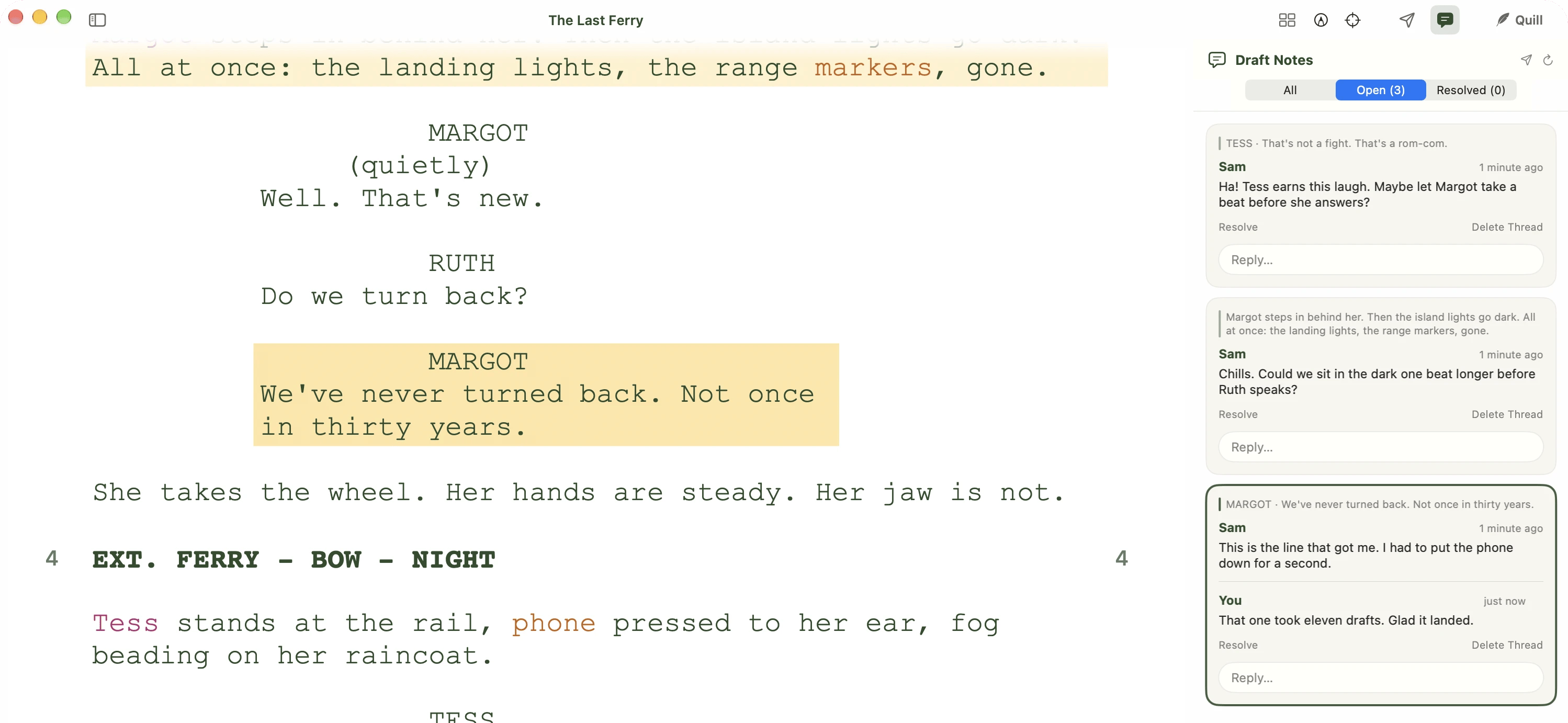
Noted passages are highlighted in your script; the selected note is brighter.
New
- Draft Notes. Reader Notes is now Draft Notes (View → Draft Notes,
⌥⌘N). Before anyone has left a note, the panel shows Get notes on this draft with a big Share a Draft… button. - Highlights in your script. Passages with an open note get a soft yellow highlight. Click one to open its note. With the panel open, moving your cursor into a passage selects its note. Press
Escto clear the selection, andEscagain to close the panel. - All, Open and Resolved. Filter the panel with a count on each. It starts on Open, so notes you’ve dealt with stay out of the way.
- Your name on the cover. A new From field in the Share sheet sets the name people see: “Jamie shared THE LAST FERRY with you, Sam.” It starts as your first name and Inkwell remembers it. Your replies carry it too, with a small “writer” tag.
- Point an old draft at the new one. Share a newer draft with someone and Inkwell offers to point their earlier link at it. Their old page shows “Jamie shared a newer draft on Nov 1. Open the new draft →“
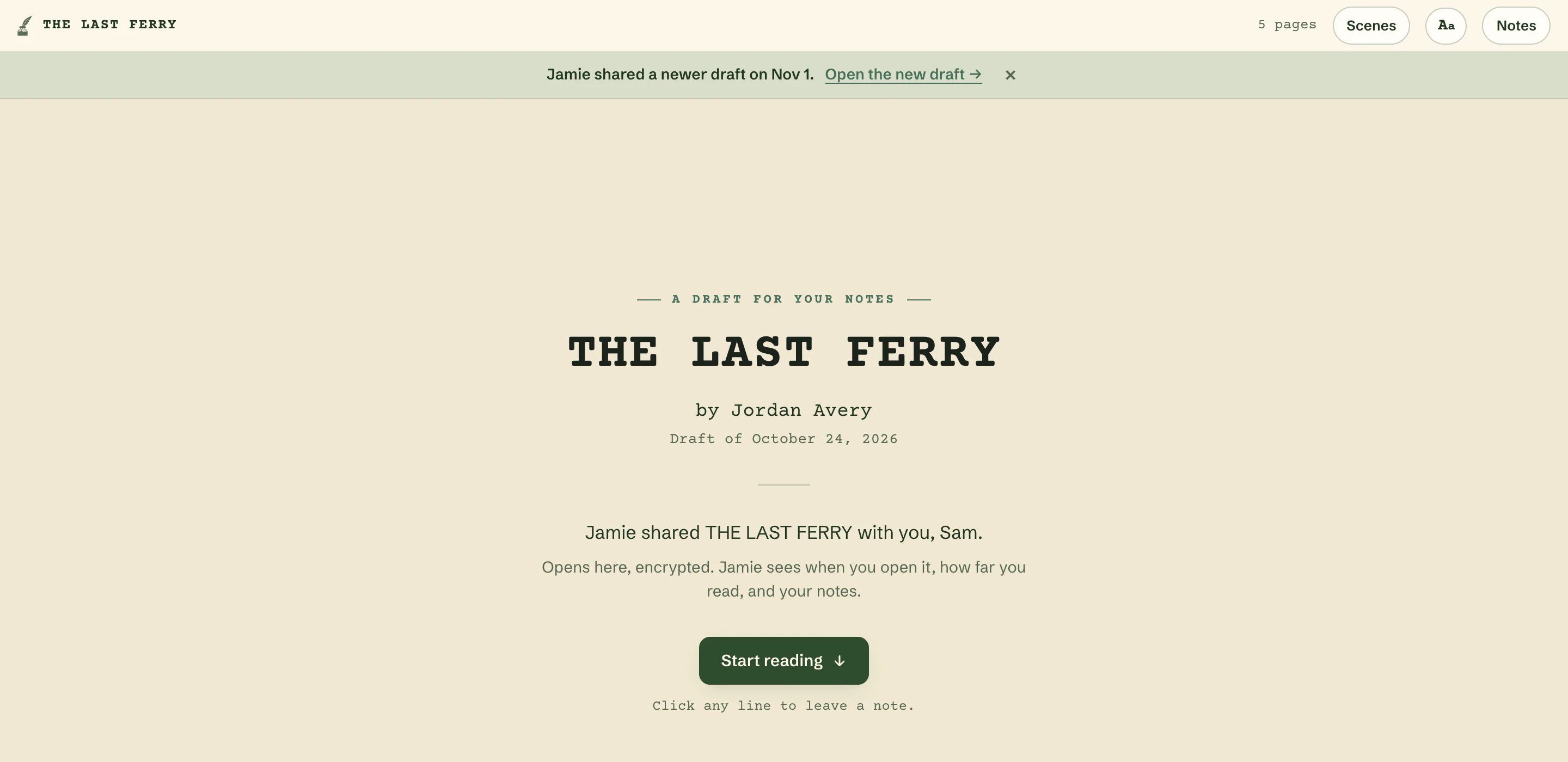
An older draft points to the newer one, and stays readable.
Improved
- One flat thread per note, on your Mac and on the shared page: each card quotes the passage it’s on, then the note and every reply in order, with times like “5 minutes ago”.
- Reply with
⌘↩in Draft Notes and on the shared page (Ctrl+Enteron other computers). The Reply… field folds away again if you click off it without typing. - Delete your own reply by hovering over it and clicking the trash icon. Inkwell asks once, right in the card.
- A tidier Share sheet. Revoked and expired links fold into their own group at the bottom, and long lists scroll.
- Header buttons show what’s open. The Outline, Draft Notes and Quill buttons look pressed while their panel is open, and every icon button has a tooltip with its shortcut.
- The shared page leaves the top of your first page peeking in under the cover, so people know the script is right there.
Fixed
- Recent Files keeps everything. A script that’s been moved, or sits on a drive that isn’t connected, is hidden from Recent Files instead of being removed, so it comes back as soon as Inkwell can reach it again.
- Clicking the note icon in the margin opens its note again.
- Highlights no longer flicker, and typing no longer lags, in scripts with many notes.
- Create Link tells you what’s missing (a name, or a password) instead of staying greyed out, and the message goes away as soon as you fix it.
- Revoking a link you just made clears its “ready” card.
- On an empty script, Share Draft explains there’s nothing to share yet, instead of offering a Save button that did nothing.
- The end of a shared draft names the person who shared it, not the script’s title-page author.
- On the shared page, the New reply tag no longer breaks onto two lines in the margin.